
✅ Profile Management in PurelyHR: How to Control Visibility of Employee Data
The Profile Management feature in PurelyHR allows administrators to control what information is visible in employee profiles based on user roles. This ensures that employees and managers only see the data relevant to them, helping maintain privacy and compliance.
Why Use Profile Management?
- Protect sensitive information.
- Customize visibility for different roles.
- Improve user experience by showing only relevant data.
How to Set Up Profile Management Permissions
1. Navigate to Profile Management
- Go to the Staff module.
- Select the Company section.
- Click Profile Management.
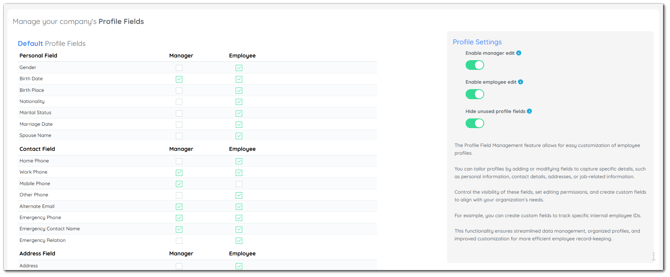
2. Assign Permissions to Roles
- Choose which fields are visible to Managers and Employees.
- Check or uncheck fields based on your preferences.
- Changes are saved automatically.
Best Practices
- Review permissions regularly to ensure compliance with privacy standards.
- Communicate changes to users so they understand what data they can view.